
Background
Plays background music on a continuous loop, the volume, target frequency and modulation of which can be adjusted over time.
Graphics
Various curves can be defined for:
Volume
This describes the volume curve during a session, e.g. gentle fade-in and fade-out, or lower volume during deep relaxation.Volume modulation
This specifies the extent to which the volume rises and falls in time with the rhythm of the brainwave frequency. Although this occurs very rapidly, the brain perceives this change and adapts to it.Filter modulation
Certain pitches can also be emphasised or attenuated relative to the target frequency, which also has an effect.Filter frequency
The filter frequency (the pitch being filtered) can also be set over time. As a rule, however, it is simply constant.List
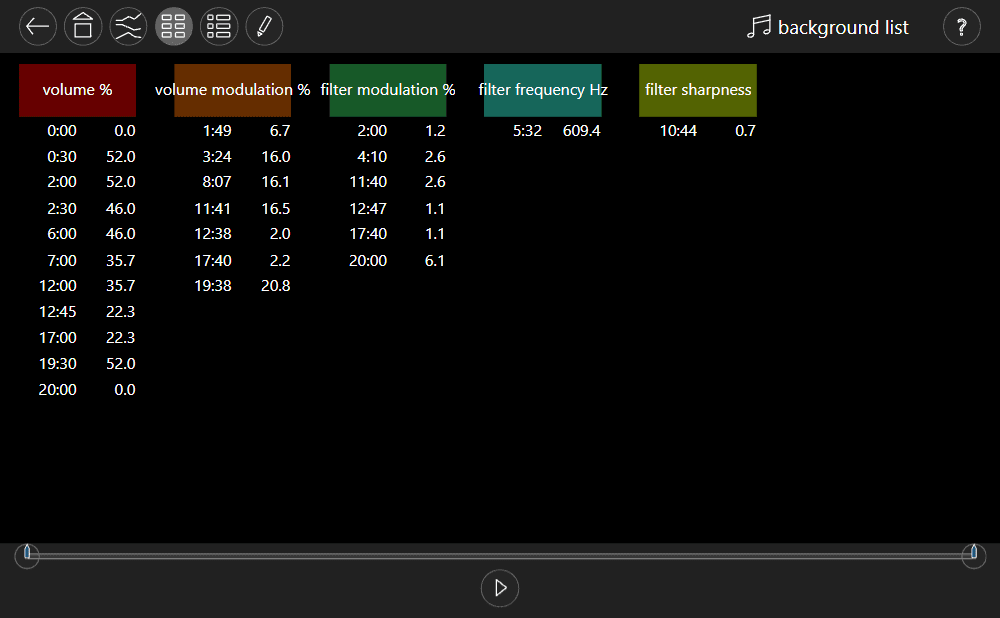
List mode is more suitable for precise values.
Properties
name
A name for the generator. The default is ‘background’.balance
Stereo balance.sound
Any audio recording. Any MP3 files can be uploaded in the settings. Suitable tracks are those lasting around 4 minutes, which fade in and out smoothly.overlap
For tracks that fade in and out, this can be used to specify the duration of the transition when the track is repeated. If, for example, a track has a fade-in and fade-out of 40s, this setting creates the impression that it is endless.For abrupt recordings, you can use very small values, such as 0.1s.
filter modulation
There are numerous filter types available:- The filter is disabled.
- The bass frequencies pass through, whilst the treble frequencies are attenuated.
- The treble passes through, whilst the bass is attenuated.
- The mid-range passes through, whilst the bass and treble are attenuated.
- The low frequencies are boosted.
- The high frequencies are boosted.
- The mid-range frequencies are boosted.
- The mid-range frequencies are attenuated.